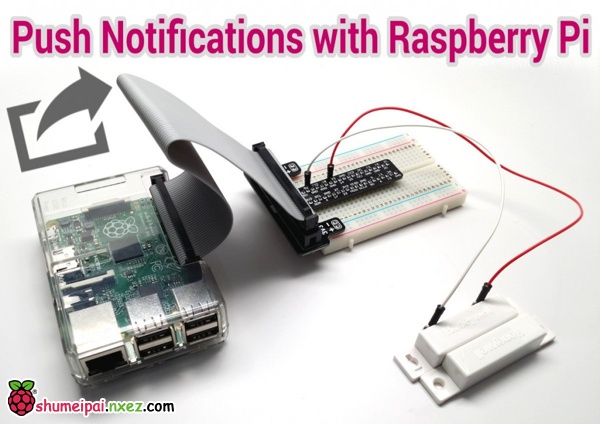
本项目说明了如何从树莓派发送推送通知给iOS和Android设备,只需要用到一个免费的推送app即可。这里的主要思想就是利用一个电磁感应门来触发推送信息的事件。当电磁门打开时,树莓派就发送消息。在这个项目中,电磁感应门可以很容易替换成其他类型的告警设备,比如PIR运动传感器,红外引信等。
作者声明:我不是个Python专家,也不是树莓派的专家。虽然我有过很多软件开发的经验,而且也曾是个全职的开发者,但这是我的第一个树莓派项目和Python应用。因此,我写的Python代码很可能不是最简洁的,而且也可能会有其他更好的方式来配置树莓派。我个人很乐意接受建设性的批评和建议。如果有任何改进的建议,请在评论栏中告诉我。
配置树莓派发送推送消息
下面各项就是我们需要完成的:
- 在Instapush上建立推送服务,并安装移动app
- 将电磁感应门连接到树莓派上
- 安装pycurl库
- 加载python代码
- 运行python应用
- 测试,获取推送通知
在Instapush上建立推送服务,并安装移动app
要处理推送通知,我使用了一个名为Instapush的免费推送服务。Instapush在iOS和Android上有免费的app,而且这个平台上也有一个易于使用的REST API供软件开发者使用。
- 首先,在https://instapush.im/注册并登陆。
- 下载移动app(iOS版,Android版)
- 登陆到app上,使用你在网站上注册的账户即可
- 在app上登陆后,你会发现控制面板中已经显示你的设备已连接到Instapush的账户上了。去这里查看https://instapush.im/dashboard.
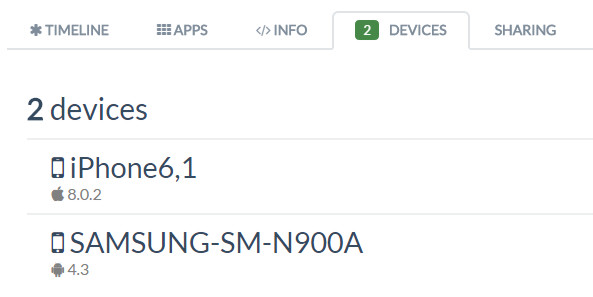
- 然后点击设备标签。我有两台设备都连接到了Instapush的账户上,见下图。
- 接下来,点击app标签。然后选择添加应用。
- 为你的应用选择一个名称,然后点击Add。我把应用命名为“Door Push”
- 添加了你的应用之后,你会进入事件界面。点击添加事件
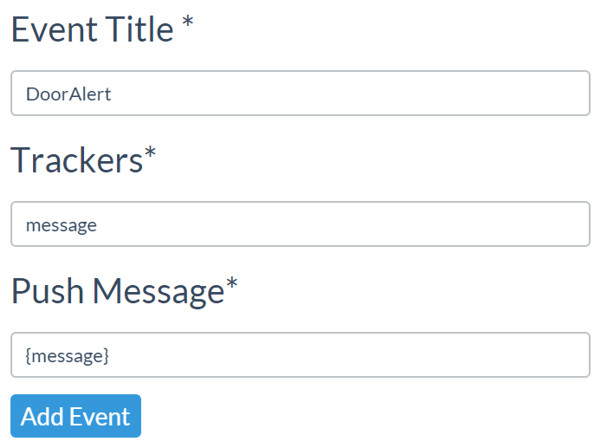
- 为你的时间选择一个标题。我建议在事件名中不要加入任何空格。我用的是“DoorAlert”
- 你需要添加至少一个tracker。这基本上就是一个用在推送通知中的变量。我给它命名为“message”
- 最后,输入你想要推送的消息内容。我的Python代码将变量{message}传给Instapush服务,因此我建议你只把{message}添加到Message字段即可。
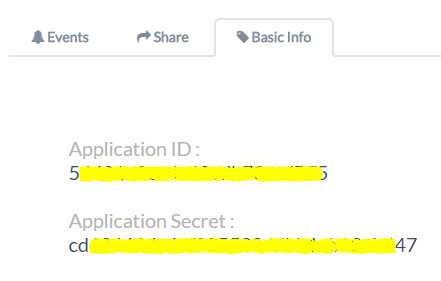
点击添加事件 - 点击Basic Info标签,记下Application ID和Application Secret fields这两个字段的内容。在编写Python代码时需要用到这些。可以参考下图中的示例。当然,我把我的ID做了些处理。
将电磁感应门连接到树莓派上
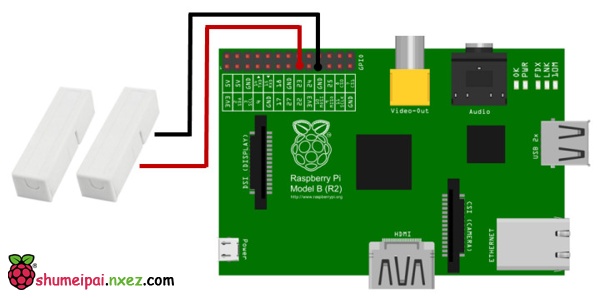
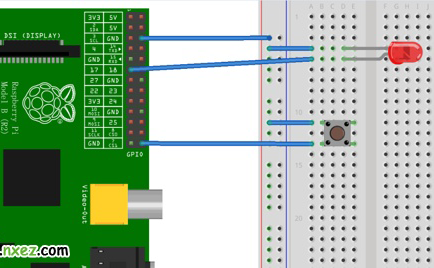
我使用了一个面包板套件来让这个过程变得简单些。我使用GPIO的第23号管脚以及接地管脚来连接电磁感应门。哪条线接GPIO,哪条线接地无关紧要。下面是示意图:
安装pycurl库
我们的Python程序需要使用一个称为pycurl的库来发送API请求给InstaPush服务。在树莓派上运行下面的命令来安装这个Python库。
|
1
|
sudo apt-get install python-pycurl |
Python代码
下面就是我编写的Python代码了。代码中的注释应该能很好的解释我在做什么。将程序命名为doorSensor.py。你可以在这里下载源代码。
|
1
2
3
4
5
6
7
8
9
10
11
12
13
14
15
16
17
18
19
20
21
22
23
24
25
26
27
28
29
30
31
32
33
34
35
36
37
38
39
40
41
42
43
44
45
46
47
48
49
50
51
52
53
54
55
56
57
58
59
60
61
62
63
64
65
66
67
68
69
70
71
72
73
74
75
76
77
78
79
80
81
82
83
84
85
86
87
88
89
90
|
# ------------- Begin doorSensor.py ------------------ #import pycurl, jsonfrom StringIO import StringIOimport RPi.GPIO as GPIO#setup GPIO using Broadcom SOC channel numberingGPIO.setmode(GPIO.BCM)# set to pull-up (normally closed position)GPIO.setup(23, GPIO.IN, pull_up_down=GPIO.PUD_UP)#setup InstaPush variables# set this to Application ID from InstapushappID = ""# set this to the Application Secret from InstapushappSecret = ""# leave this set to DoorAlert unless you named your event something different in InstapushpushEvent = "DoorAlert"# set this to what you want the push message to saypushMessage = "Door Opened!"# use StringIO to capture the response from our push API callbuffer = StringIO()# use Curl to post to the Instapush APIc = pycurl.Curl()# set Instapush API URLc.setopt(c.URL, 'https://api.instapush.im/v1/post')# setup custom headers for authentication variables and content typec.setopt(c.HTTPHEADER, ['x-instapush-appid: ' + appID,'x-instapush-appsecret: ' + appSecret,'Content-Type: application/json'])# create a dictionary structure for the JSON data to post to Instapushjson_fields = {}# setup JSON valuesjson_fields['event']=pushEventjson_fields['trackers'] = {}json_fields['trackers']['message']=pushMessagepostfields = json.dumps(json_fields)# make sure to send the JSON with postc.setopt(c.POSTFIELDS, postfields)# set this so we can capture the resposne in our bufferc.setopt(c.WRITEFUNCTION, buffer.write)# uncomment to see the post that is sent#c.setopt(c.VERBOSE, True)# setup an indefinite loop that looks for the door to be opened / closedwhile True:# door open detectedGPIO.wait_for_edge(23, GPIO.RISING)print("Door Opened!\n")# in the door is opened, send the push requestc.perform()# capture the response from the serverbody= buffer.getvalue()# print the responseprint(body)# reset the bufferbuffer.truncate(0)buffer.seek(0)# door closed detectedGPIO.wait_for_edge(23, GPIO.FALLING)print("Door Closed!\n")# cleanupc.close()GPIO.cleanup()# -------------------- End doorSensor.py -------------------- #Save the Python script on your Raspberry Pi. |
将Python脚本保存到你的树莓派上。
运行Python应用
要测试是否能从树莓派上发送推送通知,先运行doorSensor.py应用。程序跑起来之后,将电磁感应门的传感器分开。你会看到树莓派的屏幕上会打印出一些内容。第一行就是运行程序的命令,而第二行就是当我们打开门的时候所打印的。紧跟着会打印出从InstaPush的API服务接收到的响应。
|
1
2
3
4
5
6
7
|
pi@raspberrypi ~ $ sudo python doorSensor.pyDoor Opened!{“msg”:”Notification Sent Successfully”,”error”:false,”status”:200}Door Closed! |
获取推送通知
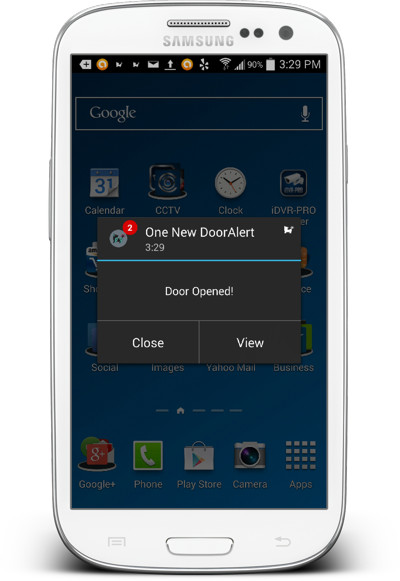
在你打开电磁门的1到2秒后,你应该在iOS或者Android设备上接收到推送通知。下图就是在我的三星Galaxy上所接收到的推送消息。iPhone上也工作的一样好。
未经允许不得转载:网购经验网 » 树莓派给智能手机发送推送通知
评论前必须登录!
登陆 注册